Slide scanning Slides transferred to disc DVD formats We only use high quality discs, usually Verbatim, as these have a long lifetime expectancy (see write-up on DVD-R Gen discs). The two main types of discs are " - R" and " + R", normally we use DVD-R discs as most DVD players can play them. If you know that your player will only play DVD+R discs please let us know and we will use these instead. Due to compatibility problems we cannot give a 100% guarantee that discs will play on every DVD player. There are various web sites that give advice about compatibility one of them being Videohelp.com or telephone us for help.
Slideshow
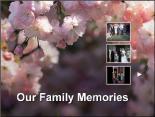
After scanning and saving your slides or negatives we can create a slideshow and burn it to a DVD. This can then be played on your television via your DVD player or shown on your computer. We can supply extra copies for all your family to enjoy. Hundreds of slides can be stored on one DVD, we suggest a maximum of about 500. Once the DVD is inserted into your player a menu screen with a thumbnail picture of each slide show will be displayed (as shown below in the two examples). Usually up to three separate slideshows are shown on this menu, but this can be increased to six if required (on the blue one). When you place your order you will be asked which images you would like displayed on the menu. Each slide show is started by clicking on the menu image. The slides are displayed for 5 seconds, by pressing pause on your player the slide can be viewed much longer. Slides to DVD Cine to DVD 8mm to DVD 16mm to DVD Video to DVD VHS to DVD Camcorder to DVD VHSC to DVD |

 |  |
 |